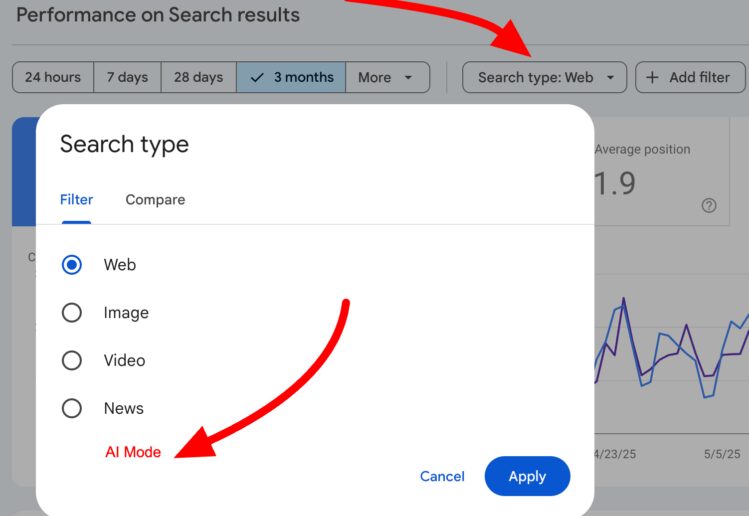
The Google Search Console AI feature is revolutionizing how webmasters interact with their performance reports by allowing them to configure Search results using intuitive natural language prompts. This experimental tool enables users to set up performance report filters and make complex metric comparisons with ease, making data analysis more accessible than ever. For example, you can simply ask to see queries from mobile searches, which the AI translates automatically into filtering conditions. However, while this innovative feature simplifies report generation, Google emphasizes the importance of reviewing any suggested settings to avoid misinterpretation. With the integration of AI configuration in Google Search Console, understanding Search results performance reports has never been more efficient, heralding a new era for those leveraging Google AI features in their digital strategies.
The newly introduced AI-driven tool within the Google Search Console allows users to streamline their analysis of search results data, using user-friendly language to engage with performance reports. Harnessing advanced AI capabilities, this feature facilitates everything from setting specific filters to comparing various metrics without necessitating manual adjustments. By utilizing direct requests such as, “list me the top queries from the last month,” users can maximize their insights effectively. It’s a game-changer for marketers and SEO specialists who value data clarity and actionable insights while navigating their online visibility. As this AI configuration evolves, it promises to save time and enhance decision-making processes in search engine optimization efforts.
Understanding the New AI Configuration in Google Search Console
The introduction of the AI-driven configuration feature in Google Search Console marks a significant advancement in how webmasters and SEO professionals can interact with performance data. Utilizing natural language prompts, this feature allows users to effortlessly configure performance reports without the traditionally required technical expertise. By enabling direct queries like, ‘Show me the average clicks for mobile devices last year,’ the AI interprets and applies the necessary filters, making data analysis more intuitive and less time-consuming.
Beyond just basic filters, this functionality enhances the user experience by simplifying complex comparisons and metric selections. For instance, users can compare traffic across different timeframes with straightforward commands, streamlining what was once a tedious task. This innovation reflects Google’s commitment to leveraging AI capabilities to enhance digital marketing efforts, ensuring that important data insights are more accessible to a wider audience.
Filters: Enhancing Search Result Analysis
Filters are a critical part of analyzing performance data, and the new AI configuration feature optimizes this process significantly. By using natural language queries, users can specify data refinement criteria such as device type, date range, or search appearance. This advancement allows for a tailored analysis experience; a request like ‘Show me queries with over 100 impressions in the last month for desktop devices’ translates directly into actionable data filters.
The user-friendly interface reduces the learning curve for new users while empowering seasoned professionals with enhanced analytical capabilities. Implementing such filters efficiently means that businesses can make informed decisions backed by precise data, ultimately leading to improved SEO strategies and higher website traffic. This simplified approach not only saves time but also aligns with the greater trend of using AI to foster deeper engagement with complex data sets.
Comparisons Made Simple: Leveraging AI for Timeframe Analysis
One of the standout features of the AI configuration tool within Google Search Console is its ability to handle complex comparisons effortlessly. Previously, users would need to manually select date ranges and apply multiple filters to derive meaningful comparisons. Now, with simple prompts like, ‘Compare traffic for my blog pages from this quarter to last year’s quarter,’ the AI automates this intricate task, showcasing the potential for increased efficiency.
The ability to conduct time-based comparisons in a fluid, conversational manner not only enhances user engagement but also influences data-driven decision-making processes significantly. SEO specialists can quickly assess how current strategies stack up against previous performance, enabling timely adjustments and strategic pivots as necessary. This feature exemplifies the blending of AI innovation with practical applications in performance monitoring, ultimately driving better outcomes for websites.
Selecting Metrics: Tailoring Insights to Your Needs
Selecting the right metrics is crucial for understanding your website’s performance, and the new AI-driven configuration tool in Google Search Console simplifies this process like never before. With instructions presented through natural language, users can specify their desired metrics, such as clicks, impressions, and average CTR, with ease. For instance, a simple query like, ‘What are the average positions for my top-performing keywords in the last 30 days?’ will allow the AI to generate the relevant metrics without the need for complex setups.
This level of customization empowers users to focus on specific data points that matter most to their business objectives. By eliminating the obstacle of technical terminology, the AI feature promotes a more efficient workflow and ensures that users can glean actionable insights directly aligned with their strategic goals. The ability to tap into tailored metrics furthers the significance of this tool, making it an invaluable asset for data-driven decision-making.
Limitations of the AI-Powered Configuration Feature
Despite the impressive capabilities of the AI configuration feature within Google Search Console, it’s essential to recognize its limitations. The tool is designed to work exclusively with Performance reports focused on Search results. As a result, users are unable to utilize this configuration approach for Discover or News reports, which can be a drawback for those seeking comprehensive analytics across all aspects of Google Search.
Moreover, the AI’s potential misinterpretation of prompts is a crucial consideration. Google advises users to thoroughly review suggested filters and settings prior to relying on the data generated. This precautionary measure ensures that critical insights are not misaligned with original queries and helps you avoid possibly misleading conclusions in reporting or strategy development.
Best Practices to Utilize AI Features Effectively
To maximize the benefits of the AI-driven configuration in Google Search Console, adopting best practices is imperative. Start by clearly defining your queries to avoid misinterpretations by the AI. It can help to phrase requests in a straightforward way, specifying keywords, desired metrics, and timeframes. This attention to detail will guide the AI to provide more accurate configurations, leading to a better understanding of your performance data.
Additionally, regularly reviewing the outputs generated by the AI is crucial. Assessing the filters and metrics suggested will increase your confidence in the results, reducing the likelihood of errors in reporting. As you become more familiar with the capabilities and limitations of this AI feature, you will be able to structure even more complex queries confidently, ultimately enhancing your overall data analysis experience.
Future Developments and Expansions in AI Features
Looking ahead, Google aims to expand the availability of the AI-powered configuration feature to more websites, enhancing its impact across the SEO landscape. While no specific timeline has been provided, the gradual rollout signifies Google’s commitment to leveraging AI in SEO practices and improving user experiences within Google Search Console. This development could pave the way for further advancements in how data is analyzed and interpreted in the digital marketing realm.
As this feature becomes more widely available, businesses will need to stay informed about new functionalities and improvements. Providing feedback through Search Console can help shape the development of AI features, allowing users to voice their needs and priorities. By embracing these advancements, webmasters can enhance their data analysis capabilities and stay ahead in the competitive digital landscape.
The Importance of AI in Modern SEO Strategies
The integration of AI features, such as the configuration tool in Google Search Console, underlines the importance of AI in contemporary SEO strategies. With the ability to analyze performance results through natural language prompts, businesses now enjoy a more accessible and efficient method for handling data insights. This development reflects the paradigm shift towards automation in digital marketing, enabling marketers to focus on strategic planning rather than getting bogged down by technicalities.
AI technologies are transforming how insights are generated, processed, and applied, allowing for rapid adaptations to changing market conditions. By incorporating AI-driven solutions into your SEO strategy, you can harness the power of data to improve website performance and optimize marketing efforts effectively. The evolving dynamic of AI within the SEO sphere will undoubtedly expand, impacting how professionals approach their digital strategies.
Testing AI Features: Gathering Feedback and Performance Insights
With Google rolling out the AI-driven configuration feature to a select group of sites, collecting feedback becomes imperative for improving performance and user satisfaction. Engaging with the community through platforms like the Google Search Central Community allows users to share their experiences, highlight challenges, and identify necessary improvements in AI functionalities. This collaborative approach not only helps Google refine their AI tools but also fosters a knowledge-sharing environment.
Moreover, actively testing these AI features while documenting their performance can yield valuable insights. Understanding how the AI interprets queries and performs under different scenarios can equip users with the knowledge to better utilize the tool in future analyses. As more users experiment with these capabilities, the collective insights will contribute to a more efficient and effective suite of AI-driven solutions in Google Search Console.
Frequently Asked Questions
What is the AI configuration feature in Google Search Console?
The AI configuration feature in Google Search Console is an experimental functionality that allows users to create Search results Performance reports using natural language prompts. It aims to simplify the reporting process by translating queries into filters, comparisons, and metric selections.
How can natural language prompts enhance my use of Google Search Console?
Natural language prompts can enhance your use of Google Search Console by allowing you to set up complex filters and comparisons without needing to navigate through the typical manual setup. For example, you can ask for specific metrics or filter data by queries and date ranges, making the configuration process more intuitive.
What types of report setups can I perform with the AI feature in Google Search Console?
With the AI feature in Google Search Console, you can configure three types of report setups: filters to refine data by criteria like query or device; comparisons to analyze different date ranges; and metric selection to request specific metrics like Clicks or Average CTR.
Are there any limitations to the AI-driven configuration in Google Search Console?
Yes, the AI-driven configuration in Google Search Console has limitations. It only works with Performance reports for Search results and does not support other types like Discover or News. Additionally, the AI cannot sort tables or export data, and may misinterpret natural language prompts.
How accurate is the AI-driven feature in Google Search Console when setting up performance report filters?
While the AI-driven feature in Google Search Console aims to streamline report setup, its accuracy can be inconsistent. It is crucial to review the suggested filters and settings to ensure they align with your intended data analysis before relying on the results.
Can I customize date comparisons using the AI configuration in Google Search Console?
Yes, you can customize date comparisons using the AI configuration in Google Search Console. You can simply input requests like ‘Compare traffic for my pages this quarter to the same quarter last year,’ and the AI will apply the appropriate settings for the comparison.
What types of metrics can I request from the Google Search Console AI feature?
You can request any combination of the four available metrics in Google Search Console: Clicks, Impressions, Average CTR, and Average Position. For instance, you can ask for metrics specific to a geographical location or a time frame.
How can I provide feedback about the AI feature in Google Search Console?
You can provide feedback about the AI feature in Google Search Console through dedicated feedback buttons available in the interface or by participating in the Google Search Central Community.
What future improvements can we expect for the AI features in Google Search Console?
Google plans to expand the availability of AI features for more websites over time. While no specific timeline has been announced, users can expect ongoing updates that may enhance usability and functionality.
| Feature | Description |
|---|---|
| AI-driven Configuration | Allows setup of Performance reports using natural language prompts. |
| Filters | Refine data by parameters like query, page, and date range through natural language. |
| Comparisons | Establish complex date comparisons with simple prompts. |
| Metric Selection | Select metrics dynamically such as Clicks, Impressions, CTR, and Position. |
| Limitations | Only works for Performance reports, cannot sort or export data. |
| Accuracy Issues | AI may misinterpret requests; suggested filters should be reviewed. |
| Future Plans | AI feature currently limited; feedback can be provided for improvement. |
Summary
Google Search Console AI feature enhances functionality by allowing users to configure Search results Performance reports using natural language. This new capability simplifies data management, making it easier to filter, compare, and select metrics without manual adjustments. Despite its usefulness, users should remain vigilant regarding potential misinterpretations by the AI, ensuring that their data is accurate and reliable before making decisions. Overall, this feature stands to significantly improve reporting efficiency in Google Search Console.